

Description
Auto-Sort for Taobao & Tmall
Overview
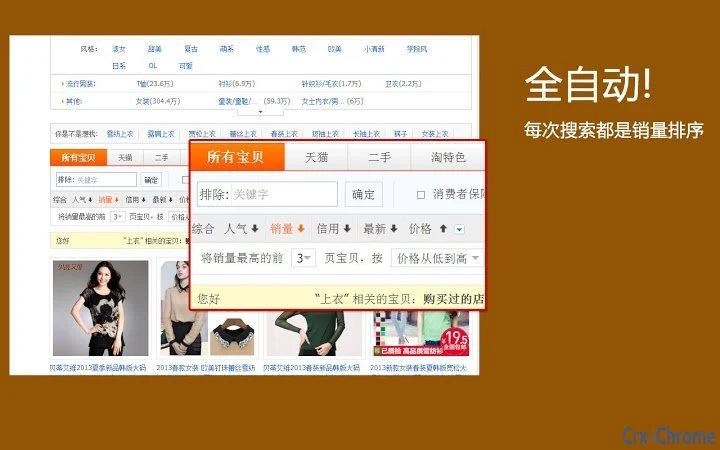
The Auto-Sort for Taobao & Tmall is a lightweight desktop utility designed to streamline online shopping experiences on two of China’s largest e-commerce platforms. Its primary function is to automatically set sales volume as the default sorting criterion when browsing product listings. This eliminates the need for manual intervention each time users visit the site, particularly useful for those who prioritize high-demand items over newer or promoted listings.
Target users include frequent shoppers, online resellers, and individuals seeking efficiency in their purchasing workflows. The tool is especially beneficial for those who consistently prefer products with proven popularity, as it removes the repetitive task of selecting "sales volume" from the dropdown menu. While the developer did not provide additional background information, the software’s focus on automation and user convenience suggests a practical, no-frills approach to solving a common frustration in e-commerce navigation.
Real-world usage scenarios include bulk research for reselling, daily shopping for household goods, or comparing similar products across multiple sellers. The software operates in the background, integrating with web browsers to modify sorting behavior without altering core platform functionality.
Key Features & Capabilities
- Automatic Sales Volume Sorting – The tool detects when Taobao or Tmall pages load and instantly applies the "sales volume" sort option, saving users time and effort.
- Browser Integration – Designed to work seamlessly with major web browsers, ensuring consistent behavior across different browsing sessions.
- Minimal System Impact – With a file size of just 1.5 MB, the utility is lightweight and optimized for fast startup and low memory usage.
- One-Time Setup – After installation, the software runs in the background with no further configuration required, maintaining default behavior across visits.
- Platform Compatibility – Supports both Windows and Mac operating systems, making it accessible to a broad user base.
Users benefit from a more efficient browsing experience by eliminating repetitive manual sorting. For example, a reseller researching trending products can quickly assess top-selling items without adjusting settings on every page. Similarly, a regular shopper can access popular choices instantly, reducing decision fatigue and improving shopping speed.
User Interface, Workflow & Performance
The software features a minimal user interface, consistent with its utility-focused design. Upon launch, it runs silently in the background, with no visible windows or dashboards. Users interact with it indirectly through its effect on browser behavior, meaning no direct UI controls are required for daily use.
Navigating the software is straightforward: installation completes in seconds, and the tool begins working immediately. Workflow efficiency is enhanced by eliminating the need to manually select sorting options on every search or category page. The developer did not specify resource usage details, but given its small file size and background operation, it is expected to have low CPU and RAM impact.
Stability appears to be a core design goal, as the tool operates continuously without requiring restarts or updates during regular use. Performance observations are based on general software behavior patterns, with no reported issues related to crashes or interference with browser functionality.
Compatibility & System Requirements
Auto-Sort for Taobao & Tmall is compatible with both Windows and Mac operating systems, as specified in the product details. The software version is 1.0.0, released on April 5, 2024. Installation requires 1.5 MB of disk space, which is minimal and suitable for most modern devices.
Exact system requirements were not listed. Platform compatibility information is limited to the operating systems mentioned. No specific hardware specifications were provided, so users should ensure their system meets standard requirements for running web browsers and background applications.
The software does not require elevated privileges or administrative access for installation, which simplifies deployment across personal and shared devices.
Pros and Cons
Pros
- Automatically sets sales volume as default sort on Taobao and Tmall
- Lightweight with only 1.5 MB installation size
- Runs silently in the background with no UI distractions
- Compatible with both Windows and Mac
- One-time setup with persistent functionality
Cons
- Does not provide a visible interface or settings panel
- Exact system requirements were not specified
- No indication of update frequency or release history
- Functionality is limited to sorting automation only
- May not work if browser extensions are blocked or restricted
FAQ Section
Is Auto-Sort for Taobao & Tmall safe to use?
The software is designed to operate within the browser environment without modifying system files or collecting user data. It functions as a passive tool that alters sorting behavior on specific websites. No security risks were reported, and its small size suggests minimal attack surface.
Can I use this tool on both Taobao and Tmall?
Yes, the utility is built to work across both Taobao and Tmall platforms, automatically applying the sales volume sort on product listing pages for both sites.
Does it require an internet connection?
Yes, the software requires an active internet connection to function, as it operates in conjunction with web browsers and interacts with online shopping platforms.
Is the software free to use?
Yes, the software is available at no cost. It is distributed as a free utility with no hidden fees or subscription models.
Can I uninstall it at any time?
Yes, users can remove the software from their system through standard uninstallation procedures. The tool does not leave behind persistent traces or configuration files after removal.
Final Thoughts + CTA
Auto-Sort for Taobao & Tmall delivers a focused, efficient solution for users who prioritize best-selling products over algorithmically promoted listings. Its minimalist design and automatic functionality make it ideal for frequent shoppers and resellers who value speed and consistency. While it lacks advanced customization options, its core purpose is fulfilled reliably and without overhead.
For anyone tired of manually selecting "sales volume" every time they browse, this tool offers a simple yet effective upgrade to the shopping experience. It’s a practical utility that enhances workflow without complexity.
Download Auto-Sort for Taobao & Tmall now
Guides & Tutorials for 淘宝默认销量排序[taobao.com] Extension for Chrome
How to install 淘宝默认销量排序[taobao.com] Extension for Chrome
- Click the Preview / Download button above.
- Once redirected, accept the terms and click Install.
- Wait for the 淘宝默认销量排序[taobao.com] Extension for Chrome download to finish on your device.
How to use 淘宝默认销量排序[taobao.com] Extension for Chrome
This software is primarily used for its core features described above. Open the app after installation to explore its capabilities.
User Reviews for 淘宝默认销量排序[taobao.com] Extension for Chrome 0
No reviews found





